Building an accessibility program without a dedicated team


Accessibility landed on your desk. Maybe it came from a customer complaint, or maybe your legal team forwarded a demand letter. Or your manager just said, “Can you own this?” and moved on with their day.
Every guide you found assumed a dedicated accessibility team, a governance committee, and an engineering queue that exists to fix issues. None of which is coming.
One person can run a digital accessibility program when they own accountability and sequencing. Testing and actual fixing are different kinds of work, and no amount of effort turns one person into a testing team. Below, AudioEye covers what you can build on your own, what you have to hand off, and how to put both into practice.
Yes, and many companies are doing so right now with one person’s name on it. Most of them started the same way, after a complaint or a demand letter brought accessibility to the top of their priority list.
What makes a one-person program work is a narrower definition of the job. When accessibility falls on you, the instinct can be to think you now have to become the person who finds and fixes the issues. That’s the version that isn’t possible on your own. You can make some progress solo, but you’ll hit a ceiling well before your site is actually accessible, and that ceiling isn’t about how hard you work.
The actual job is smaller than the one you may be picturing. You’re accountable for the program and decide what happens and in what order. You’re the person who knows which pages matter to the business, which release is coming, and who to go to when something has to change. That’s context about your company that you already have, rather than information that requires accessibility expertise.
The expertise is what gets supplied. Finding the issues a scan can’t detect, verifying that a checkout flow works for someone using a screen reader, engineering the harder fixes, producing the documentation enterprise customers ask for — that work comes from an accessibility partner, not you. The bottom line: One person can run a digital accessibility program when they own accountability and sequencing, and a partner does the testing and fix work.
The difference becomes clear once you see how these programs actually develop.
The Five Stages of Accessibility Maturity
Most people inheriting accessibility have no idea whether they’re behind, and there’s no obvious way to tell. The accessibility maturity model below gives you a read: five stages from unaware to integrated, and most mid-market companies begin at stage two, after a complaint or a demand letter.
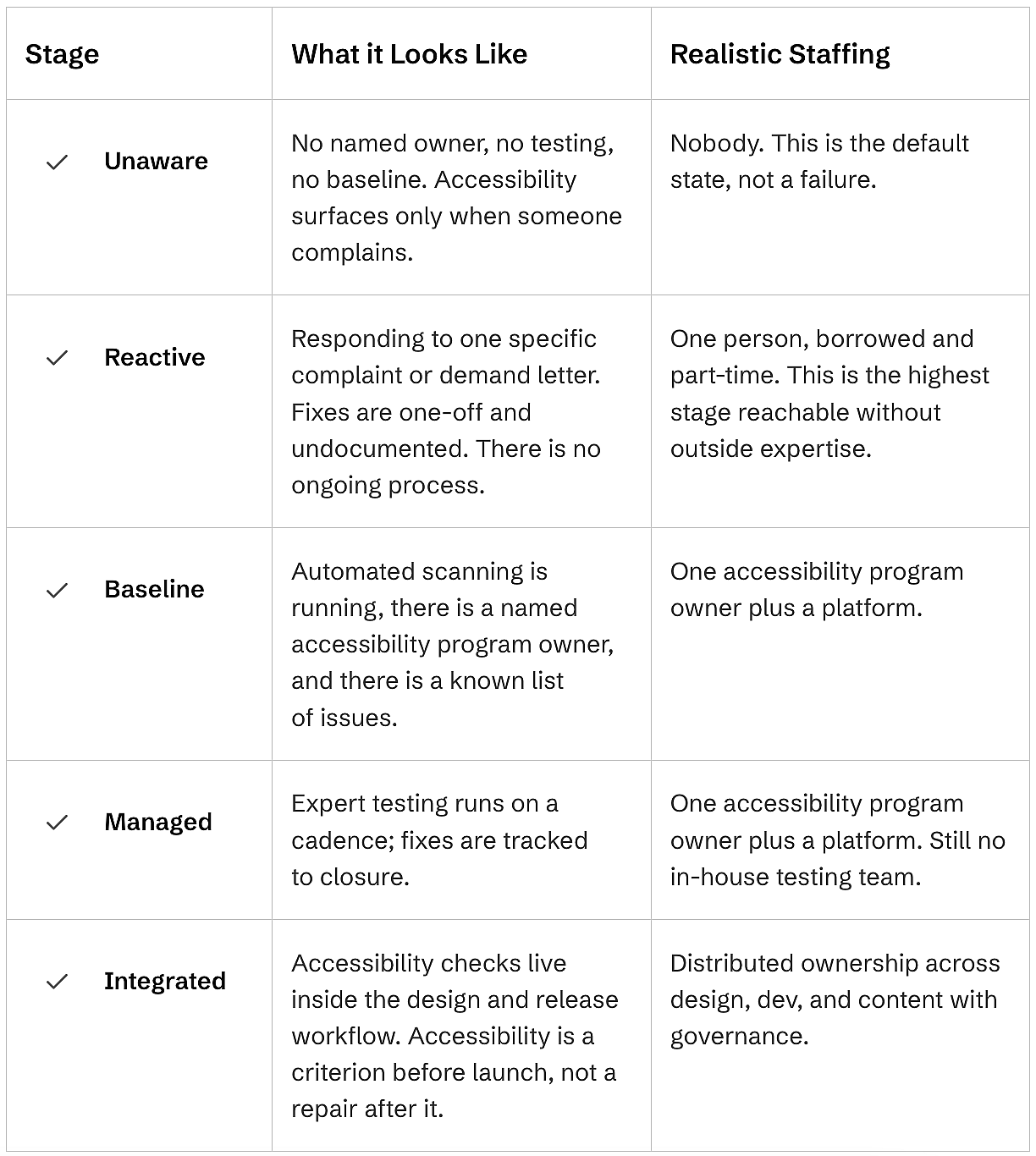
Find your row, then look at the one under it.
Getting from stage two to stage three is the move that matters. Naming an owner is free. Continuous automated scanning isn’t, and without it, you’re guessing at the size of the problem. This is where programs either get a platform or sit at stage two for years.
After that, it’s cadence: testing on a schedule, fixes tracked to closure, and documentation kept current. Stage five is where accessibility becomes someone else’s step too, and most mid-market companies don’t need to be there yet.
What to Outsource and What to Own Internally
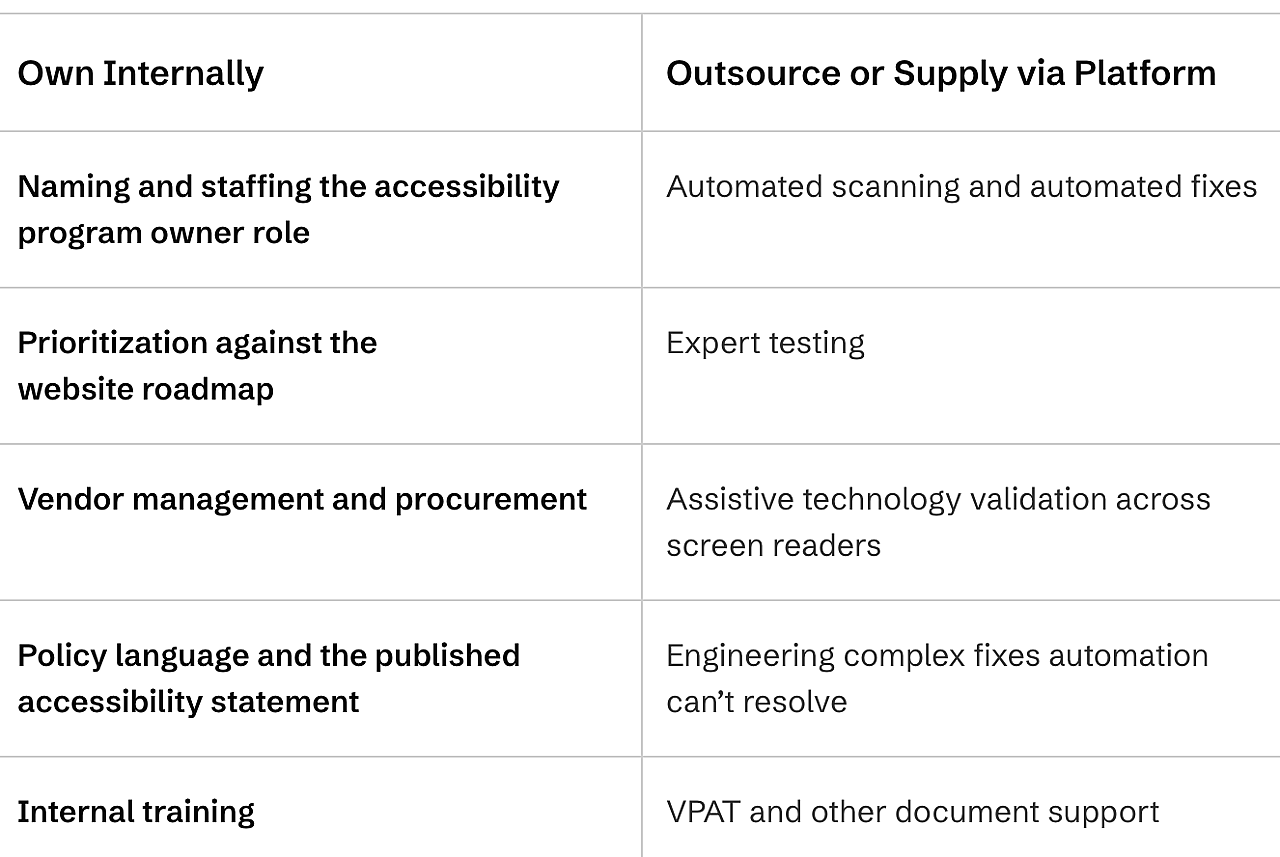
An accessibility program owner keeps four things in-house: accountability for the program, prioritization against the roadmap, vendor management, and policy, including the public accessibility statement. Everything that requires specialized testing skills gets outsourced or supplied through a platform instead.
This split works because of how the two kinds of work actually get done.
Automated scanning covers volume and catches common issues on every page in seconds. Expert testing covers judgment: the criteria that ask whether alt text actually describes an image or whether a keyboard user can complete a task, something no automated tool can detect on its own.
What Each Role Needs to Know When Nobody Is an Accessibility Expert
Nobody on a small team needs to become an accessibility expert. Each role needs a short, specific list of what to watch for in their own work, and nothing more.
Marketer
A marketer supporting an accessibility program needs to know alt text, link text, heading order, and color contrast.
In practice, that means writing alt text that conveys what an image shows, writing link text that makes sense out of context rather than ‘click here,’ keeping heading levels in order, and checking contrast on landing pages, email templates, and ad creative. That’s the whole list. Your marketers don’t need to know the full list of WCAG criteria, run audits, or interpret a scan report. And asking them will cost you their attention on the four things that matter.
Developers
A developer supporting an accessibility program needs to know semantic HTML, keyboard operability, and how to read a fix ticket. As marketers, they do not need to know the full set of WCAG 2.1 Level AA criteria.
The practical version is: Use native semantic elements before reaching for ARIA, make every interactive element keyboard operable, manage focus deliberately in modals and dynamic content, and be able to action a fix ticket without someone translating it first. Expert auditing and assistive technology testing aren’t their job. Those come from your platform, and a developer who can implement a well-written fix is worth more to the program than one who can half-run an audit.
Designers
A designer supporting an accessibility program needs to know about color contrast ratios, target sizes, and not to encode meaning in color alone.
Most of this gets solved once in the design system rather than page by page: contrast minimums baked into the palette, touch targets sized adequately, a visible focus state designed on purpose rather than left to the developer, and no information carried by color itself. Designers don’t need to test with screen readers or understand how fixes are implemented. They need to stop new issues from entering the site, which is the cheapest accessibility work there is.
Content Editors
A content editor supporting an accessibility program needs to know document structure, descriptive links, captions, and table headers.
Day-to-day, that’s structuring pages with real headings rather than bolded text, writing links that describe where they go, captioning videos, and properly marking up table headers in the CMS. Nothing here is technical, and none of it requires touching the codebase. It’s mostly a matter of using the CMS the way it was built to be used, which is why this role tends to show the fastest improvement once someone explains it.
Your First 90 Days
A working digital accessibility program takes about 90 days to stand up, and the order matters as much as the actions themselves.
Days 1 to 30
The first 30 days are about naming and knowing, not fixing. Name the accessibility program owner in writing, so the role has an actual person attached to it. Run an automated baseline scan across the site, because every later decision depends on knowing the current state. Inventory the ten highest-traffic templates, and flag the highest-risk flows first: checkout, forms, and login. Brief leadership on what the scan found before day 30 ends, so budget conversations start early instead of late.
Days 31 to 60
With a baseline in place, days 31 to 60 shift from knowing to fixing. Select and onboard a platform that combines automated fixes with expert testing. Testing waits until now on purpose: the baseline scan is what tells you which templates need it most. Get expert testing scheduled on your highest-traffic templates. Open a tracked fix backlog so nothing found gets lost between departments. Run one 30-minute training session each for marketing and development, using the role breakdown above.
Days 61 to 90
The last 30 days turn the work into a program instead of a project. Publish a public accessibility statement that names your commitment and how users can report an issue. Set a monitoring and reporting cadence that the accessibility program owner can sustain on their own; monthly is realistic for most mid-market teams. Add an accessibility check to your design and release workflow, even a lightweight one. Agree to a quarterly review with leadership so the program has a standing checkpoint rather than relying on memory.
What a One-Person Accessibility Program Owner Needs from an Accessibility Platform
A one-person accessibility program owner should require a platform that combines automation with expert testing, continuous monitoring, and documentation support, so that no in-house testing capability is needed.
Here’s what those look like as requirements you can ask a vendor:
- Automated detection and fixes, running continuously rather than on request
- Expert testing performed by professionals and individuals with disabilities
- Continuous monitoring instead of point-in-time assessment, because your site changes frequently
- Documentation and VPAT support, since procurement and enterprise customers will ask
- Legal response support, so a demand letter does not become your problem alone
- Reporting you can hand to leadership without translating it first
Those six are the shortlist, and the gaps are what to interrogate. If a vendor covers the first two but not monitoring, you’re buying an audit, which describes your site on one day. If it covers monitoring but not expert testing, you’re buying a scanner, which describes the parts of your site that a machine can evaluate. Either one leaves you holding work you can’t do alone.
What This Looks Like in Practice
Mid-market companies with a working accessibility program aren’t the ones with the largest budgets. They’re the ones where a single person got named, got a baseline, and stopped trying to do the expert work themselves.
The pattern is consistent. Someone in marketing or IT takes the program, onboards a platform in the first month, and gets automated coverage running before they’ve read a single WCAG success criterion. Expert testing follows on the highest-traffic templates, turning a long issue list into a short, ordered one. After that, the job is maintenance, and the owner spends their time prioritizing instead of discovering.
Frequently Asked Questions
Do you need an accessibility team to comply with the ADA?
No; however, an accessibility team does make the compliance process easier. The Americans with Disabilities Act (ADA) sets no staffing requirement, so compliance depends on whether a website meets the standard, not on who is employed to maintain it.
How many people do you need to run an accessibility program?
One accountable accessibility program owner is enough to run stages one through four of a digital accessibility program, provided expert testing and fixes come from a platform rather than an in-house team.
Who should own accessibility at a mid-market company?
Whoever already owns the website roadmap, usually someone in marketing, IT, or operations, not a new hire.
Should you hire an accessibility specialist or use a platform?
For many mid-market companies, a platform can get you there faster. Hiring a specialist means a recruiting cycle, a salary, and testing capacity still capped at one person once they’re in the seat.
How long does it take to set up an accessibility program?
A working digital accessibility program can be set up in 90 days: a named accessibility program owner and a baseline scan in the first 30 days, expert testing by day 60, and a published accessibility statement with a monitoring cadence by day 90.
Is automated scanning enough on its own?
No. It catches a meaningful share of issues, but it can’t make the judgment calls that require a person, which is why expert testing runs alongside it.
What’s the first thing to do if you have no accessibility program at all?
Name an owner and run a scan. Everything else, the outsourcing decisions, the 90-day plan, the role breakdowns, depends on knowing who’s accountable and what’s actually broken today.
This story was produced by AudioEye and reviewed and distributed by Stacker.
